
Base44 is an AI app builder: you describe the application you need, then refine the generated pages and behavior through conversation and the editor. Its platform includes app hosting and tools for data and user access. That makes it worth evaluating when a spreadsheet has become difficult to use and a team needs a small shared application.
The useful test is specific: can you create a request tracker that saves a record, shows it to the right person and preserves an update after reloading? This guide gives you a first-build brief and a way to judge the result before subscribing.
Research basis: official documentation reviewed on 1 November 2026. This is a documentation-based guide with original illustrative examples. We have not run this build in an authenticated Base44 account.
What does Base44 actually do?
Base44’s getting-started guide describes a workflow of explaining an idea, customizing the generated app, testing it and publishing. You work with an AI conversation, an app preview and dashboard settings. The platform can generate the interface and supporting data structure; you still have to check whether they implement your requirements.
For example, “make a maintenance dashboard” leaves several unanswered questions. Who can submit a request? Which fields are required? Can users see other people’s records? What happens when a request is incomplete? If you do not decide these things, a generated app may make assumptions that do not fit the business.
Start by defining one journey instead of an entire product. Our fictional property management team wants staff to log routine maintenance requests and mark them as reviewed. The first version will not message tenants, dispatch contractors, decide urgency or take payments.
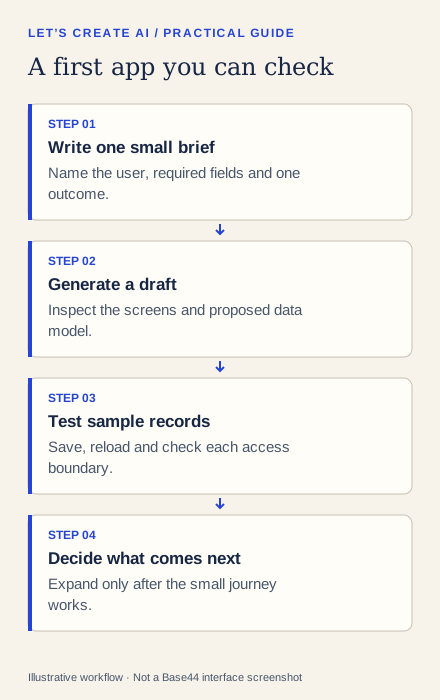
A good first app has a small acceptance test
Before opening the builder, write down what “working” means. For our example:
- A staff member can enter a property reference, location and short issue description.
- Submitting the form creates one saved request.
- A review screen lists requests and their current status.
- An authorized reviewer can change a request from New to Reviewed.
- The status remains correct after the page is refreshed.
These checks are more informative than whether the first generated screen looks polished. They also make follow-up prompts precise: you can describe the failing step rather than ask the builder to “make it work.”
How to start your first Base44 build
1. Prepare a brief and synthetic examples
Use made-up property references and descriptions. A first experiment does not need tenant details, lease documents, access instructions or a connection to your current operational system.
The following prompt is our own example specification. Adjust it to your needs and inspect any plan or confirmation the tool offers:
Create a small staff-only routine maintenance request tracker.
Use synthetic data only. Do not connect external services.

Screens:
1. New request: property_reference, location, description.
2. Review queue: request ID, property, description, status.
3. Request detail: the saved fields and a reviewer status action.

Statuses: New, Reviewed, Closed. Start new requests as New.
Require all three form fields. Preserve the form if saving fails.
Show success only after the record is saved.
Use clear labels, readable text and a narrow-screen layout.

No automatic urgency decisions, emails, contractor dispatch,
payments or tenant portal. Explain any missing prerequisite.
Show the proposed data model and access approach before expanding.
2. Generate the smallest useful version
Read the proposed structure. Does it include the three requested screens? Did it invent extra integrations? Remove additions that make the first test harder to understand. If you use a planning option, resolve the data and access questions there before building.
Base44’s prompting guidance recommends concrete requests and focused changes. Treat each follow-up as a small edit with a clear result. Ask for the missing validation message or one corrected field, then retest that behavior.
3. Verify saved data, not just the success message
Submit one synthetic request. Reload the list and locate the same record. Open it, change its status as an authorized reviewer and refresh again. A form that clears itself but creates no record fails the test.
Inspect the app’s data through its dashboard as well. Confirm the record count and field values. If a duplicate appears after a double-click, ask for an explanation of the save behavior and repeat the test before adding features.
| Check | Example input | Pass condition |
|---|---|---|
| Normal save | TEST-P001 / shared hallway / loose handle | One saved request with the entered values |
| Missing location | TEST-P001 / empty / loose handle | A useful error; no incomplete record |
| Status update | New → Reviewed | The authorized change survives reload |
| Access boundary | A second sample user | Only the access you explicitly intended |
Figure 2. An illustrative acceptance matrix. These are expected checks, not results we observed in Base44.
What should you check before paying?
Separate the cost of building the app from the cost of running its features. Base44’s credits documentation distinguishes AI-building messages from built-in integration usage. A working form and an email-heavy workflow may have different operating requirements.
Write down which features your prototype actually needs. Check the current plans, renewal terms and account limits. Private app visibility, workflows, test-data facilities and custom domains have their own availability requirements. Verify the specific feature before choosing a plan; this guide does not quote a fixed price or guarantee a free build.
For customer-facing use, also clarify who owns the account, who maintains the app, how records can be exported and how access is removed when someone leaves. Base44 is a hosted platform. Do not assume a generated application automatically meets a requirement for deployment on your own infrastructure.
When is Base44 a useful fit?
It is worth evaluating for a bounded internal tracker, an early business prototype or a small workflow whose records and user roles you can describe. The first test should show that you can understand, correct and verify the result.
Investigate more deeply if the requirement depends on sensitive data, complex approvals, regulated decisions or a deployment model the platform does not demonstrably support. A generated login screen and a reassuring chat response do not establish that permissions are correct.
If the first build fails, reduce the task. Keep the form, one record type and one review action. Test those again before requesting a large dashboard or connecting another service. Your useful outcome is a small working journey with understood limits.
What does the referral link offer?
The link below belongs to the publisher’s credit-based referral program. Eligible referrals can earn us usage credits. It is not evidence of membership in Base44’s separate cash Affiliate program. Check the current referral conditions and your account before relying on a bonus; eligibility and expiry rules apply.