
A service report should tell the next person what was requested, what the technician observed and did, what evidence supports those statements, and what remains open. You can make one without buying software or using AI: keep a source record, enter one visit in a CSV or spreadsheet, copy verified facts into a report template, and have the technician and coordinator review the same version before anyone sends it.
This guide gives you that complete free method, a fictional worked example, and downloadable files. The optional offline Python script only makes unapproved drafts and flags some missing or conflicting fields. It cannot check whether work happened, whether a photo matches an asset, or whether equipment is safe.
Who this is for: a small field team whose technician hands a visit record to an office coordinator. This starts after the visit; our separate scheduling guide covers assigning crews before work begins.
Verification note: we checked the downloadable CSV, archive hashes and ten local script tests with eight fictional visits. We have not tested it with a real customer, actual photographs, signatures, a live work-order system or an operational approval process. Adapt the template and records controls to your own work.
Get the free starter
Use the download panel above for the complete ZIP, sample CSV, report template and review checklist. No account or email is required. Open the ZIP in a local folder; keep the original CSV unchanged while you work on a copy. LibreOffice Calc is available without a licence fee if your team does not already have a spreadsheet editor. Your device, storage, backup and review time still need management.
1. Collect one visit’s source records
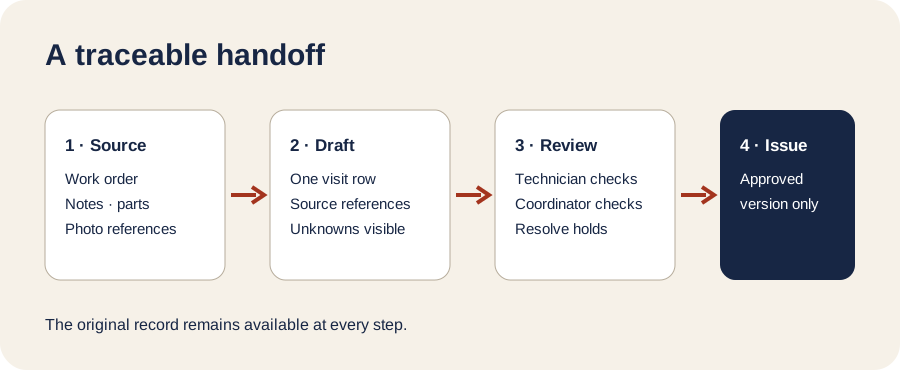
Start with the original work order, visit date, asset identifier, technician notes, action log, parts or stock record, photo files if taken, and any customer acknowledgment. Keep their original versions. Give the visit a unique job ID and point it to the work-order ID. A report without that link is difficult to audit.
Separate observed facts from inferred explanations. “Filter visibly dusty” is an observation. “Fault caused by filter” is a diagnosis that needs its own evidence and qualified review. Do not turn a missing value into a positive claim. In this starter, an empty cell means unknown or missing; NONE means someone has explicitly recorded that there was none. Neither value proves the underlying work was checked.
The CSV has one row per visit and 20 named columns. The included dictionary explains each. Record the requested task, original note, actions entered as approved, part codes and quantities, photo IDs, recorded job status, unresolved items, follow-up owner, acknowledgment reference, and two review flags. The wording “approved” in an input column is still only an input assertion until a reviewer checks its source.
2. Copy facts into a draft, with their source
For one visit, open service_report_template.md in a text editor. Copy the row’s values into the matching sections. Keep the raw technician note visible, mark missing items as missing, and place an evidence reference next to each important statement. Do not invent a completion time, price, repair outcome or customer promise.
Here is the fictional FS-1001 example. It is a demonstration, not an approved report:
| Report statement | Recorded source | What still needs checking |
|---|---|---|
Visit FS-1001 for work order WO-1001 |
job_id, source_ref |
Open the original work order |
| Intake filter replaced | approved_actions, approved_parts |
Compare the action log and stock transaction |
| Before and after images referenced | photo_refs |
Open both files and confirm asset and sequence |
Status COMPLETE |
job_status |
Compare with scope and unresolved items |
Acknowledgment ACK-1001 |
customer_ack_ref |
Inspect the record and what it acknowledges |
The starter’s completed example shows the entire trace table. Even there, the source work order, actual photos, part transaction and acknowledgment were not independently supplied. A photo ID is a pointer, not photographic proof; customer acknowledgment does not by itself certify technical acceptance.
3. Resolve exceptions before approval
A technician checks the draft against the visit and original records. A coordinator then checks the work-order link, open items, evidence access, customer acknowledgment, permitted recipients and the next owner. Use the downloadable checklist and write both reviewers’ identities, dates and the controlled version in your own system of record. A prefilled APPROVED cell in a CSV is not a signature.
| If you see… | Hold the draft and… |
|---|---|
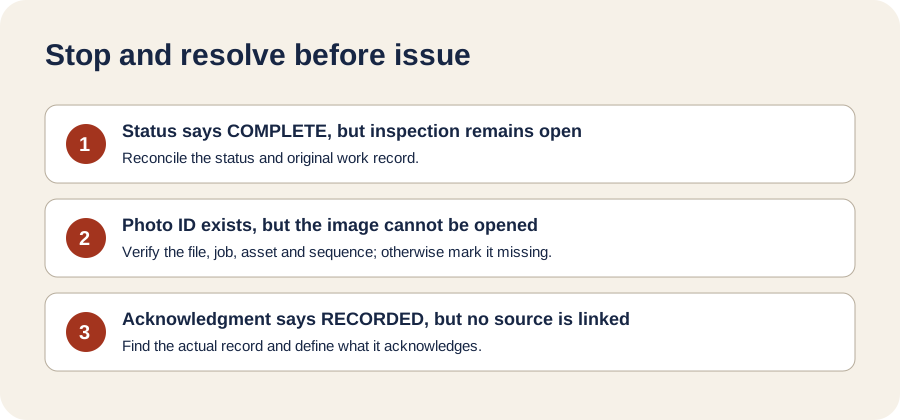
COMPLETE plus an unfinished inspection |
Correct the recorded status or resolve the item with evidence; do not hide it |
| Photo ID but no accessible image | Locate the file and verify the job, asset and sequence; otherwise mark evidence missing |
| Part recorded without a stock transaction | Reconcile the inventory record with the technician; avoid asserting installation meanwhile |
PARTIAL or OPEN without a next owner |
Assign a person through the team’s process and record the handoff |
| Acknowledgment marked recorded without a reference | Find the record or change the status; explain what the acknowledgment means |
| Safety-critical or regulated work | Use the organization’s qualified inspection and approval process; this template is no certificate |
When a discrepancy remains, leave the draft on hold. Do not issue a clean-looking PDF that conceals it. Once the technician and coordinator have checked a version, store that approved version in the team’s authorized records system and share it only with permitted recipients. Follow your own retention and access policy. A later correction should create a new version with a trace to the earlier one.
4. Optional: draft several reports offline
If you have Python 3.9 or newer, the ZIP includes a standard-library script. From the extracted package folder, run:
python3 script/report_drafter.py --csv data/fictional_jobs.csv --out my_drafts
python3 -m unittest discover -s tests -v
On Windows, use py -3 instead of python3. The fictional input should produce eight *-DRAFT.md files, a QA_INDEX.md, and ten passing tests. Read the index first, then the flagged drafts. FS-1004 deliberately says COMPLETE while its internal inspection remains open; the script marks that conflict. It also flags a missing photo reference, missing work-order ID, absent acknowledgment reference and missing follow-up owner in other sample rows. It never approves or sends a report, even if review columns say APPROVED.
For a real supervised pilot, first copy your records into a controlled local folder and remove unnecessary personal information. Verify CSV encoding and column names, run into a new empty output folder, inspect every flagged draft, and compare all assertions with original records. If an output is wrong, discard the generated folder, correct the copied input, and regenerate. Keep signed versions elsewhere; never overwrite them with drafts. The no-code template remains enough for a single visit or a team without Python.
When AI or a field-service platform helps
AI can help organize inconsistent notes or rewrite grammar after you have a verified source record. Ask it to retain unknowns and evidence references and label every proposed statement for review. It cannot infer an installed part, inspection result, safe operating condition or customer acceptance from a vague note. Do not send private job details to an external model without the required permissions, supplier assessment and data controls. Any external model/API/subscription cost is paid by the customer separately from a custom build.
A form or work-order platform may help if the team needs mobile capture, role permissions, image storage or larger volumes. Jobber’s documentation describes checklist exports and notes that image files themselves do not appear in its CSV report. MaintainX’s documentation describes work-order CSV and PDF exports. These are documented capabilities, not accounts we tested or a recommendation to buy a particular plan. Check current features, limits, export quality and access controls in your own trial before migration. There is no affiliate link in this guide.
If you need a reporting workflow connected to your own work orders, document store and review roles, tell us about the process through the project request form. We design custom AI tools and automations for field teams and other industries, with client-hosted or assisted deployment options. Start with the free checklist and sample first; a custom system only makes sense when the specific handoff and evidence controls are clear.
A final report is a controlled decision
The useful outcome is a report whose statements can be traced to a work order, note, part record or verified image, with open work visible and human approval recorded. The CSV, template and optional script help assemble that evidence; the technician and coordinator remain responsible for its truth and release. Neither a generated draft nor a COMPLETE label is a safety certificate.
Join the conversation
Questions & comments
Reviewed before publication. No account needed.
Comments will load when you reach this section.
Leave a comment